Summary 테이블 구현
Airflow+Redshift로 간단한 ELT 구현을 알아보자
Summary table: 간단한 DAG 구현을 살펴보기
Build_Summary.py: MAU 요약 테이블을 만들어보자
from airflow import DAG
from airflow.operators.python import PythonOperator
from airflow.models import Variable
from airflow.hooks.postgres_hook import PostgresHook
from datetime import datetime
from datetime import timedelta

from airflow import AirflowException

import requests
import logging
import psycopg2

from airflow.exceptions import AirflowException

def get_Redshift_connection():
    hook = PostgresHook(postgres_conn_id = 'redshift_dev_db')
    return hook.get_conn().cursor()


def execSQL(**context):

    schema = context['params']['schema']
    table = context['params']['table']
    select_sql = context['params']['sql']

    logging.info(schema)
    logging.info(table)
    logging.info(select_sql)

    cur = get_Redshift_connection()

    sql = f"""DROP TABLE IF EXISTS {schema}.temp_{table};CREATE TABLE {schema}.temp_{table} AS """
    sql += select_sql
    cur.execute(sql)

    cur.execute(f"""SELECT COUNT(1) FROM {schema}.temp_{table}""")
    count = cur.fetchone()[0]
    if count == 0:
        raise ValueError(f"{schema}.{table} didn't have any record")

    try:
        sql = f"""DROP TABLE IF EXISTS {schema}.{table};ALTER TABLE {schema}.temp_{table} RENAME to {table};"""
        sql += "COMMIT;"
        logging.info(sql)
        cur.execute(sql)
    except Exception as e:
        cur.execute("ROLLBACK")
        logging.error('Failed to sql. Completed ROLLBACK!')
        raise AirflowException("")


dag = DAG(
    dag_id = "Build_Summary",
    start_date = datetime(2021,12,10),
    schedule = '@once',
    catchup = False
)

execsql = PythonOperator(
    task_id = 'mau_summary',
    python_callable = execSQL,
    params = {
        'schema' : '~~~', # 자신의 스키마로 변경
        'table': 'mau_summary',
        'sql' : """SELECT
  TO_CHAR(A.ts, 'YYYY-MM') AS month,
  COUNT(DISTINCT B.userid) AS mau
FROM raw_data.session_timestamp A
JOIN raw_data.user_session_channel B ON A.sessionid = B.sessionid
GROUP BY 1
;"""
    },
    dag = dag
)
이 부분을 dbt로 구현하는 회사들도 많음 (Analytics Engineer)
https://www.getdbt.com/
별도 강의에서 다룰 예정
Summary table: 이번에 사용자별 channel 정보를 요약해보자
앞서와 비슷하게 PythonOperator를 만들고 아래처럼 params 파라미터를 설정
params = {
    'schema' : 'keeyong',
    'table': 'channel_summary',
    'sql' : """SELECT
    DISTINCT A.userid,
    FIRST_VALUE(A.channel) over(partition by A.userid order by B.ts rows between unbounded preceding and unbounded following) AS First_Channel,
    LAST_VALUE(A.channel) over(partition by A.userid order by B.ts rows between unbounded preceding and unbounded following) AS Last_Channel
    FROM raw_data.user_session_channel A
    LEFT JOIN raw_data.session_timestamp B ON A.sessionid = B.sessionid;"""
},
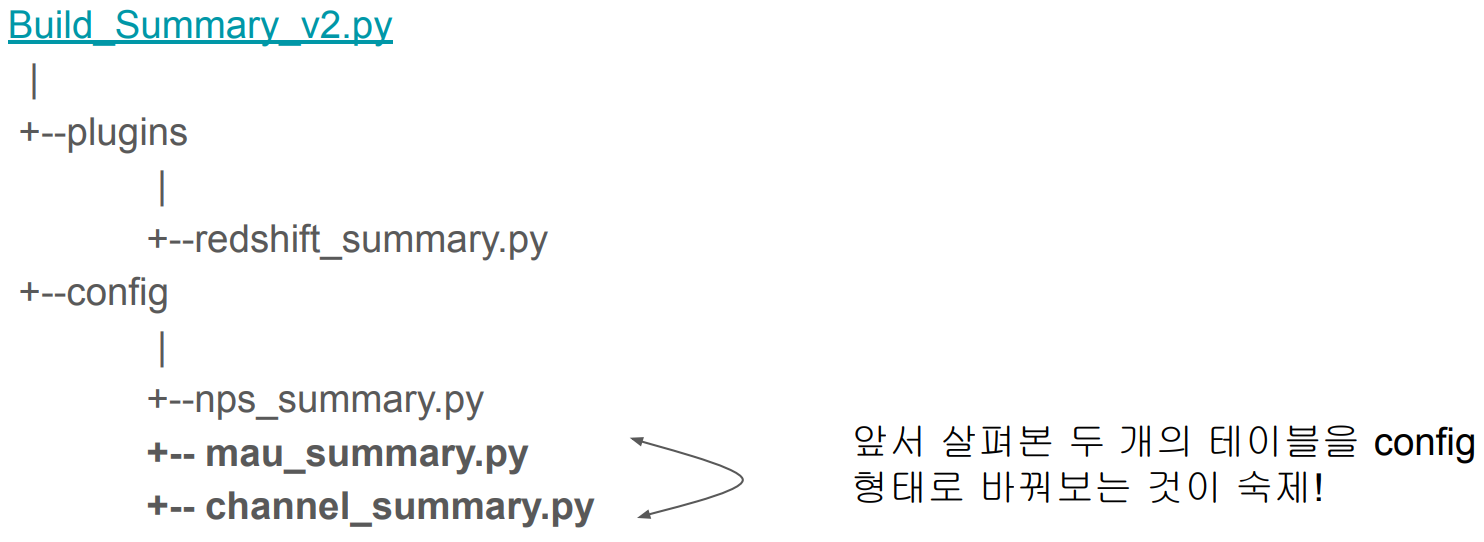
CTAS 부분을 아예 별도의 환경설정 파일로 떼어내면 어떨까?
환경 설정 중심의 접근 방식
config 폴더를 생성
그 안에 써머리 테이블별로 하나의 환경설정 파일 생성
- 파이썬 dictionary 형태로 유지할 것이라 .py 확장자를 가져야함
이렇게 하면 비개발자들이 사용할 때 어려움을 덜 느끼게 됨
그러면서 더 다양한 테스트를 추가
mau_summer.py
{
 'table': 'mau_summary',
 'schema': 'keeyong',
 'main_sql': """SELECT …;""",
 'input_check': [ ],
 'output_check': [ ],
}
NPS 써머리 테이블을 만들어 보자 (1)
NPS란? Net Promoter Score
10점 만점으로 '주변에 추천하겠는가?'라는 질문을 기반으로 고객 만족도를 계산
10, 9점 추천하겠다는 고객(promoter)의 비율에서 0-6점의 불평고객(detractor)의 비율을 뺀 것이 NPS
- 7, 8점은 아예 계산에 안 들어감

NPS 써머리 테이블을 만들어 보자 (2)
각자스키마.nps 테이블 혹은 raw_data.nps 테이블 기준으로 일별 nps 써머리 생성
먼저 SQL을 만들어보자
일별 NPS 계산 SQL
SELECT LEFT(created_at, 10) AS date,
    ROUND(
        SUM(
            CASE
                WHEN score >= 9 THEN 1
                WHEN score <= 6 THEN -1
            END
        )::float*100/COUNT(1), 2
    ) nps
FROM keeyong.nps
GROUP BY 1
ORDER BY 1;
NPS Summary를 주기적으로 요약 테이블로 만들기 (1)
CTAS 부분을 아예 별도의 파일로 떼어내면 어떨까?
환경 설정 중심의 접근 방식
config/nps_summary.py
{
'table': 'nps_summary',
'schema': 'keeyong',
'main_sql': """SELECT (생략...);""",
'input_check':
[
{
'sql': 'SELECT COUNT(1) FROM keeyong.nps',
'count': 150000
},
],
'output_check':
[
{
'sql': 'SELECT COUNT(1) FROM {schema}.temp_{table}',
'count': 12
}
],
}
NPS Summary를 주기적으로 요약 테이블로 만들기 (2)
새로운 Operator와 helper 함수 구현
NPS Summary를 주기적으로 요약 테이블로 만들기 (3)
새로운 Operator와 helper 함수 구현
다른 방법은 dbt 사용하기
Analytics Engineering (ELT)
Build_Summary_v2.py
from airflow import DAG
from airflow.macros import *

import os
from glob import glob
import logging
import subprocess

from plugins import redshift_summary
from plugins import slack


DAG_ID = "Build_Summary_v2"
dag = DAG(
    DAG_ID,
    schedule_interval="25 13 * * *",
    max_active_runs=1,
    concurrency=1,
    catchup=False,
    start_date=datetime(2021, 9, 17),
    default_args= {
        'on_failure_callback': slack.on_failure_callback,
        'retries': 1,
        'retry_delay': timedelta(minutes=1),
    }
)

# this should be listed in dependency order (all in analytics)
tables_load = [
    'nps_summary'
]

dag_root_path = os.path.dirname(os.path.abspath(__file__))
redshift_summary.build_summary_table(dag_root_path, dag, tables_load, "redshift_dev_db")
'Airflow 고급 기능, dbt, Data Catalog' 카테고리의 다른 글
| Airflow와 구글시트 연동하기 - 개요와 sheet → Redshift (0) | 2024.01.02 |
|---|---|
| Slack 연동하기 (0) | 2024.01.02 |
| Airflow 환경설정 데모 (0) | 2024.01.01 |
| ELT 작성과 구글시트/슬랙 연동 (0) | 2024.01.01 |
| 개요 (0) | 2024.01.01 |