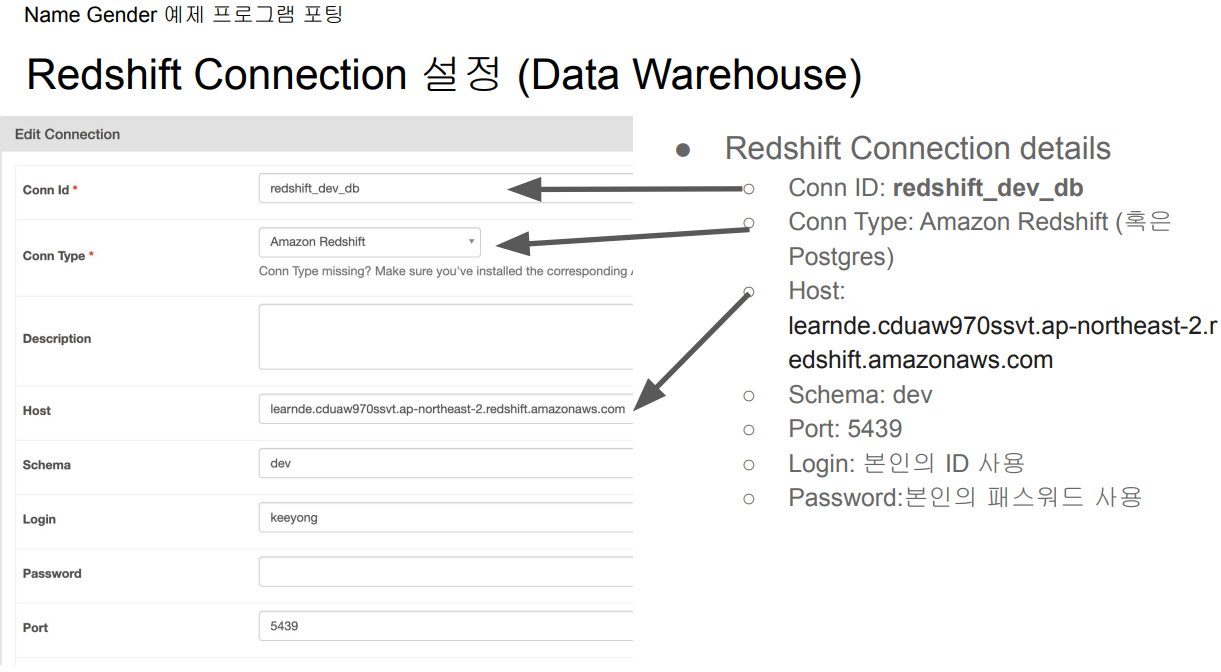
이제 Coon ID인 redshift_dev_db를 이용하면 다른 값들을 굳이 조회하거나 노출할 필요 없이 사용할 수 있습니다.
NameGenderCSVtoRedshift.py 개선하기 #4
Redshift Connection 사용하기
NameGenderCSVtoRedshift_v4.py
schema 변경 잊지 말기!
PostgresHook을 import
from airflow.providers.postgres.hooks.postgres import PostgresHook
Connections로 개선
def get_Redshift_connection(autocommit=True):
    hook = PostgresHook(postgres_conn_id='redshift_dev_db')
    conn = hook.get_conn()
    conn.autocommit = autocommit
    return conn.cursor()
get_Redshift_connection() 함수내에 있던 민감한 정보들을 코드 바깥으로 빼내는데 성공했습니다.
# from plugins import slack

dag = DAG(
    dag_id = 'name_gender_v4',
    start_date = datetime(2023,4,6), # 날짜가 미래인 경우 실행이 안됨
    schedule = '0 2 * * *',  # 적당히 조절
    max_active_runs = 1,
    catchup = False,
    default_args = {
        'retries': 1,
        'retry_delay': timedelta(minutes=3),
        # 'on_failure_callback': slack.on_failure_callback,
    }
)
추가로 잠깐 살펴보자면 모든 태스크에 적용되는 default_args에 실패시(on_failure_callback) 실행할 수도 있는 함수(slack.on_failure_callback)가 정의되어 있네요. 현재는 주석처리 했습니다.
NameGenderCSVtoRedshift.py 개선하기 #5
from airflow.decorators import task
task decorator를 사용
이 경우 xcom을 사용할 필요가 없음
기본적으로 PythonOperator 대신에 airflow.decorators.task를 사용
NameGenderCSVtoRedshift_v5.py
schema 변경 잊지 말기!
task를 import
# from airflow.operators.python import PythonOperator
from airflow.decorators import task
PythonOperator는 더 이상 사용하지 않고 task를 import해 데코레이터 사용
@task 데코레이터
@task
def extract(url):
    logging.info(datetime.utcnow())
    f = requests.get(url)
    return f.text


@task
def transform(text):
    lines = text.strip().split("\n")[1:] # 첫 번째 라인을 제외하고 처리
    records = []
    for l in lines:
      (name, gender) = l.split(",") # l = "Keeyong,M" -> [ 'keeyong', 'M' ]
      records.append([name, gender])
    logging.info("Transform ended")
    return records


@task
def load(schema, table, records):
    logging.info("load started")
    cur = get_Redshift_connection()
    """
    records = [
      [ "Keeyong", "M" ],
      [ "Claire", "F" ],
      ...
    ]
    """
    # BEGIN과 END를 사용해서 SQL 결과를 트랜잭션으로 만들어주는 것이 좋음
    try:
        cur.execute("BEGIN;")
        cur.execute(f"DELETE FROM {schema}.name_gender;")
        # DELETE FROM을 먼저 수행 -> FULL REFRESH을 하는 형태
        for r in records:
            name = r[0]
            gender = r[1]
            print(name, "-", gender)
            sql = f"INSERT INTO {schema}.name_gender VALUES ('{name}', '{gender}')"
            cur.execute(sql)
        cur.execute("COMMIT;")   # cur.execute("END;")
    except (Exception, psycopg2.DatabaseError) as error:
        print(error)
        cur.execute("ROLLBACK;")
    logging.info("load done")
별 다른 정의가 없다면 @task 데코레이터 아래의 함수 이름들이 태스크의 ID가 됩니다.
PythonOperator 사용시 인자로 받던 **context를 더 이상 인자로 사용하지 않습니다.
실행 데모
앞서 5가지 버전을 실행해보자
git clone https://github.com/learndataeng/learn-airflow
웹 UI와 Command line 두 개를 사용
'Airflow' 카테고리의 다른 글
| Airflow - 커맨드 라인에서 Variables와 Connections 세팅 (0) | 2023.12.13 |
|---|---|
| Airflow - Web UI로 Variables와 Connections 세팅 (0) | 2023.12.13 |
| Airflow - Name Gender 예제 프로그램 포팅 (0) | 2023.12.13 |
| Airflow - Python Operator (0) | 2023.12.13 |
| Airflow 기본 프로그램 실행 (0) | 2023.12.12 |